

Table of Contents
- How to Choose the Right Laser Cutting and Engraving Materials
- The Best Wood for Laser Engraving and Cutting
- Acrylic and Plastic Sheets: Cast vs. Extruded
- Metal Engraving and Cutting with Fiber Lasers
- MDF, Composites, Leather, and Glass
- Materials to Avoid Laser Cutting: The Do Not Cut List
- Laser Engraving Settings for Beginners
- Frequently Asked Questions
Last Updated: September 6, 2026
Choosing the right substrate is the difference between a crisp, professional piece and a charred, wasted blank. The 10 best materials for laser cutting and engraving range from versatile hardwoods to engineered plastics, but each demands specific machine settings and safety considerations. This guide from Dr. Stymie's Maker Products, LLC. breaks down the top performers, the settings that make them shine, and the materials you should never feed into your machine.
The real secret to mastering laser cutting materials isn't buying the most expensive stock. It's understanding how your laser's wavelength and power interact with the substrate's density and chemical makeup. Get that relationship right, and you'll produce clean edges with minimal charring. Get it wrong, and you'll spend hours sanding off burn marks or replacing ruined optics.
Below, we'll walk through the ten best materials, explain how to dial in speed and power settings, and give you a clear do-not-cut list that could save your machine from toxic fumes. We'll also cover the post-processing tricks that separate hobby pieces from professional work.
How to Choose the Right Laser Cutting and Engraving Materials
Laser cutting and engraving materials fall into two broad categories: those that vaporize cleanly and those that melt or fracture. Wood and acrylic vaporize or melt predictably, which makes them forgiving for beginners. Metals require a fiber laser because the wavelength of a CO2 laser passes right through reflective surfaces without transferring energy.
Start by asking what your finished piece needs to do. A decorative sign tolerates minor charring. A precision gearbox spacer does not. That answer narrows your options before you spend a cent on stock.
Laser Type and Material Compatibility
Laser type determines material compatibility because each laser emits a different wavelength that interacts with substrates in unique ways. CO2 lasers, operating around 10.6 micrometers, excel at cutting and engraving wood, acrylic, leather, glass, and paper (sciencedirect.com). Diode lasers in the 450-455 nanometer range handle wood and darker acrylics but struggle with clear materials and most metals. Fiber lasers, typically around 1064 nanometers, are the only practical choice for metal engraving and cutting.
Your laser's wavelength is non-negotiable. You cannot engrave stainless steel with a CO2 tube, and you cannot cut thick hardwood efficiently with a low-wattage diode. Match the machine to the material before you match the material to the project.
Material Thickness and Laser Power
Material thickness directly dictates the laser power and pass count required for a clean cut. A 40-watt CO2 laser cuts 3 mm Baltic birch plywood in a single pass at moderate speed (instructables.com). The same laser needs two or three passes to get through 6 mm stock, and each pass increases charring on the cut edge.
A practical rule: max cutting thickness for a CO2 laser is roughly 8-10 watts of power per millimeter of material. A 60-watt machine handles 6 mm plywood confidently. A 40-watt machine bogs down above 4-5 mm and produces rough, burn-heavy edges. For engraving, depth control matters more than raw power, so lower wattage with multiple passes gives you finer detail.
The Best Wood for Laser Engraving and Cutting
Wood remains the most popular laser cutting material because it cuts cleanly, engraves with beautiful contrast, and comes from renewable sources. The best wood for laser engraving and cutting balances low resin content, consistent density, and minimal grain variation. Softwoods like pine contain pitch pockets that vaporize unevenly and leave sticky residue on your lens. Hardwoods generally produce crisper results.
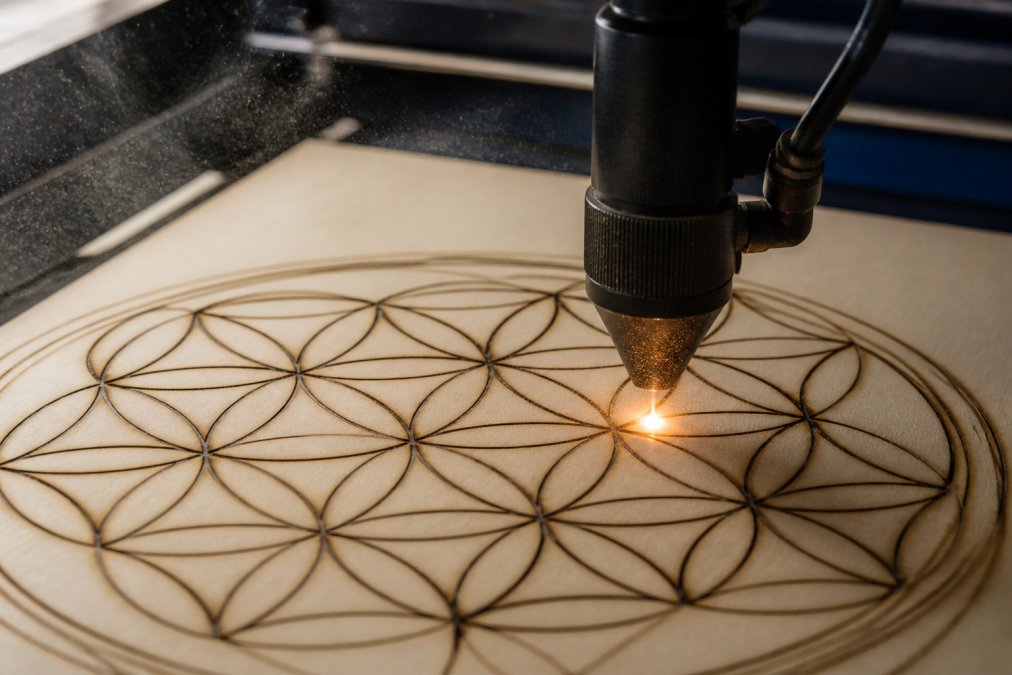
Baltic birch plywood is the undisputed champion for laser work. Its thin, uniform veneers cut with minimal edge char, and its smooth face takes fine engraving detail without blotching. Solid hardwoods like cherry, maple, and walnut also perform well, though their natural grain creates visual texture that can obscure intricate designs.
Baltic Birch Plywood
Baltic birch stands apart from standard plywood because its inner plies contain no voids or filler. Standard plywood has gaps in the core that cause the laser beam to skip and produce inconsistent cuts. Baltic birch's solid core means every pass cuts at the same depth, giving you clean edges and predictable engraving contrast.
This material is laser-safe through and through, with no formaldehyde-heavy glue lines that release harmful fumes. It is the default choice for architectural models, custom signs, and any project requiring precision. Choose 3 mm for detailed cuts and 6 mm for structural pieces.
Hardwoods vs. Softwoods
Hardwoods win for engraving because their tight grain produces high contrast between burned and untouched areas. Cherry engraves to a dark chocolate brown, maple to a light golden tone, and walnut to a deep espresso. Softwoods engrave with a lighter, fuzzier result because their open grain scatters the beam.
For cutting, avoid softwoods entirely if you can. Pine and fir contain resin that bubbles and spatters under the beam, leaving rough edges and sticky deposits on your work grid. If you must cut softwood, increase air assist to clear debris and expect to sand the edges afterward.
Acrylic and Plastic Sheets: Cast vs. Extruded
Acrylic is the go-to plastic for laser work because it cuts and engraves with a clean, polished edge. The distinction between cast acrylic and extruded acrylic changes how you approach each job. Cast acrylic, made by pouring liquid acrylic into molds, produces a frosted white engraving that looks like sandblasted glass (acplasticsinc.com). It cuts cleanly with a slightly matte edge.
Extruded acrylic, forced through a die in continuous sheets, is cheaper and more consistent in thickness, but it engraves to a cloudy, rough finish and tends to melt rather than vaporize at the cut line. Use cast acrylic for engraved products like awards and signage. Use extruded acrylic only for simple cuts where edge clarity is not critical.
Always confirm your acrylic sheet is laser-safe before cutting. Many plastic sheets sold for general fabrication contain PVC or other chlorine-based materials that release toxic gases when vaporized.
Metal Engraving and Cutting with Fiber Lasers
Metal requires a fiber laser because CO2 and diode wavelengths reflect off metallic surfaces without transferring energy. Fiber lasers mark metals by creating a localized oxidation layer rather than cutting through them. This produces durable, high-contrast marks on stainless steel, aluminum, and brass without weakening the material.
For cutting thin metals, fiber lasers handle sheet thickness up to about 1-2 mm depending on wattage. Anodized aluminum engraves beautifully because the laser removes the colored anodized coating to reveal the bare silver metal beneath. Bare aluminum requires a marking compound to achieve dark contrast.
Fiber lasers cost considerably more than CO2 machines, so most hobbyists outsource metal engraving or invest only when production volume justifies the expense. The table below summarizes how each laser type maps to material categories.
| Laser Type | Best Materials | Limitations | Typical Use |
|---|---|---|---|
| CO2 | Wood, acrylic, leather, glass, paper | Cannot mark bare metal | Signs, gifts, models |
| Diode | Wood, dark acrylic, leather | Slow on thick stock | Hobby engraving |
| Fiber | Metals, some plastics | Expensive, no wood cutting | Industrial marking |
MDF, Composites, Leather, and Glass
Beyond the big two categories of wood and acrylic, several materials earn their place in a well-stocked maker shop. Each has quirks that affect both settings and final finish.
MDF and Composite Boards
MDF, or medium-density fiberboard, cuts consistently because its uniform composition has no grain or voids. The trade-off is edge quality: MDF edges char darkly and require sanding or sealing. It also contains urea-formaldehyde resins that release irritants when cut, so run strong fume extraction and avoid cutting it in enclosed spaces.
MDF engraves with a smooth, even contrast that suits painted or stained projects. Its low cost makes it ideal for prototypes and templates, though the dust from cutting is fine and requires a proper mask during cleanup.
Leather and Faux Leather
Natural leather engraves with a rich, dark brand that works beautifully for wallets, keychains, and patches. Vegetable-tanned leather produces the best contrast because it contains no chrome compounds that release toxic fumes. Faux leather, typically polyurethane over a fabric backing, cuts cleanly at lower power but can melt if you push speed too high.
The catch with leather is consistency. Natural hides vary in thickness and oil content, so test each batch before running a production job. Masking tape over the surface prevents smoke staining on lighter leathers.
Glass and Ceramic Engraving
Glass and ceramic do not cut with a laser; they fracture. Engraving works by creating micro-cracks on the surface, which appear as a frosted mark. CO2 lasers engrave glass reliably at low power and high speed, but any attempt to cut through the material will shatter it.
Coat glass with a thin layer of dish soap or use specialized marking spray to reduce surface tension and prevent chipping. Ceramic tiles engrave similarly, with the added benefit that the mark is permanent and dishwasher-safe. Both materials require a honeycomb work bed to keep the focal point consistent across the surface.
Materials to Avoid Laser Cutting: The Do Not Cut List
Certain materials release toxic gases, damage your machine, or create fire hazards. The list of materials to avoid laser cutting is short but absolute. Never cut PVC or vinyl, which release chlorine gas that destroys optics and harms your lungs. Avoid ABS plastic, which melts into a sticky mess and emits hydrogen cyanide when overheated.
Polycarbonate, often sold as Lexan, absorbs CO2 laser energy and chars badly instead of cutting. Fiberglass and carbon fiber release hazardous particulates and dull your lens. Any material containing chlorine-based compounds, including some treated woods and foams, produces corrosive fumes.
Laser Engraving Settings for Beginners
Laser engraving settings for beginners come down to three variables: speed, power, and pass count. These interact differently across materials, so the fastest path to consistent results is systematic testing rather than guesswork.
Speed, Power, and Pass Count
Speed controls how fast the beam moves across the material. Lower speed means more energy per spot, which produces deeper engraving but increases charring. Power controls the beam's intensity. Pass count determines how many times the laser traces the same path.
Start with the manufacturer's recommended settings for your machine, then run a test grid that varies power from low to high at a fixed speed. Mark the settings that produce the cleanest result for each material. This test grid becomes your reference library and eliminates wasted stock.
Test Cuts and Material Logs
Maintain a material log that records the exact settings for every substrate you use. Include the material name, thickness, laser power, speed, frequency, and air assist pressure. Note the edge quality and whether the piece needed post-processing.
This log is your most valuable tool. When you revisit a material after months away, you bypass the trial-and-error phase entirely. A 10-minute test cut before each production run also catches drift in your machine's calibration, saving you from ruining a full batch.
Post-processing transforms good laser work into great pieces. Light sanding with 220-grit paper removes light char from wood edges. A damp cloth wiped over acrylic removes the fine dust left by vaporization. Denatured alcohol cleans smoke residue from engraved glass without leaving streaks.
For wood pieces, a coat of mineral oil or clear finish deepens the engraving contrast and protects the surface. Sealing MDF edges with wood glue or shellac prevents moisture absorption and keeps the charred edge from rubbing off on hands.
The ten materials covered here handle the vast majority of laser projects, from custom gifts to production runs. Master their settings, respect the do-not-cut list, and keep a detailed material log, and you will produce consistent, professional results. For personalized pieces and small production runs, the Dr. Stymie's Maker Products, LLC. Maker Lab combines modern fabrication technology with hands-on craftsmanship. You bring the idea; we will conduct the experiment.
Choosing the right substrate is only half the battle; dialing in your machine's settings and knowing which materials to avoid completes the picture. At Dr. Stymie's Maker Products, LLC., we apply these principles daily across custom laser engraving, personalized gifts, and small production runs. Whether you need a one-off piece or a full batch, our Maker Lab turns your concept into a finished product with the same attention to material selection and finish quality described here. Get started with Dr. Stymie's Maker Products, LLC. and see what your idea becomes.
Frequently Asked Questions
What is the best material for laser engraving for beginners?
Baltic birch plywood is the best starting point. It has a consistent density and thin glue layers that cut cleanly with minimal charring. Basswood and poplar are also forgiving hardwoods. Avoid materials with unknown coatings, as they can produce poor results or toxic fumes. Start with 3 mm birch plywood and run a test grid to find your ideal speed and power settings.
What materials should not be laser cut?
Never cut PVC, vinyl, or any chlorine-based materials because they release toxic gases that can damage your laser and harm you. Avoid polycarbonate, which tends to melt and catch fire, and ABS plastic, which produces hazardous fumes. Fiberglass and carbon fiber are also dangerous because they can release irritants. When in doubt, check the manufacturer's data sheet for laser safety.
Can you laser cut all types of plastic?
No. Only specific plastics are safe for laser cutting. Cast and extruded acrylic are the standard choices, cutting cleanly with a polished edge. Other plastics like polycarbonate, ABS, and PETG are risky; they can melt, warp, or emit toxic gases. Materials like PVC and vinyl are strictly off-limits. Always verify the plastic type and its laser compatibility before starting.
Is MDF or plywood better for laser cutting?
Plywood, particularly Baltic birch, is better for most laser projects. Its layered structure provides strength and a clean edge, though it can have small voids. MDF cuts very consistently with smooth edges, but it contains formaldehyde resins that produce more fumes and can dull the laser lens faster. For engraving detail, birch plywood is the clear winner.